
Google Consent Mode v2 and Tag Manager
How the plugin sends Google Consent Mode v2 signals, the difference between Basic and Advanced mode, and how Google Tag Manager, GA4 and Ads tags load.
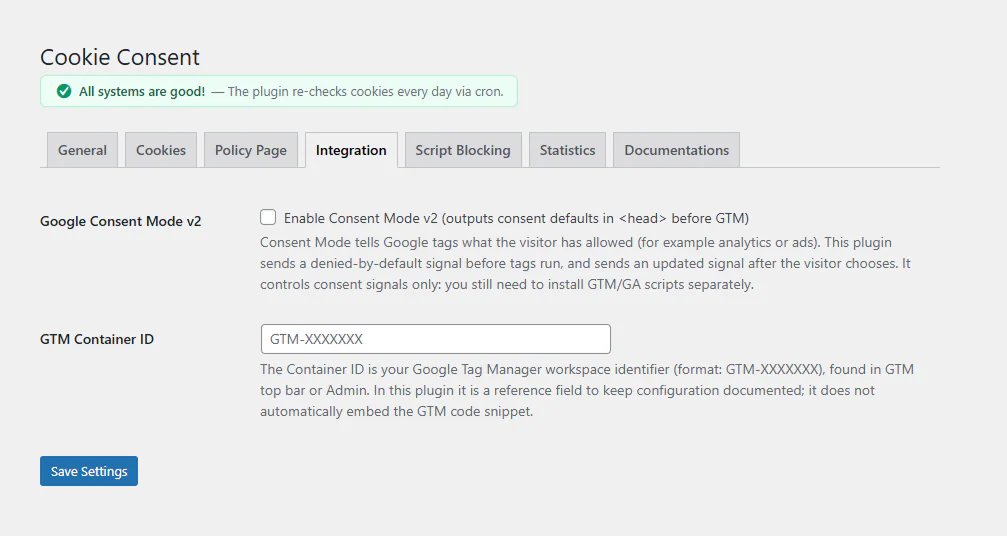
Google Consent Mode tells Google’s tags what the visitor has allowed. The plugin sets the signals; you do not need a separate template in Google Tag Manager.
Turn it on
Consent Mode v2 is on by default on the Integration tab. If Google Site Kit is active, it is always on.
The signals
Before any other script, the plugin prints the default state in the page <head>:
| Signal | Before a choice | Granted when the visitor allows |
|---|---|---|
analytics_storage |
denied | Analytics |
ad_storage |
denied | Marketing |
ad_user_data |
denied | Marketing |
ad_personalization |
denied | Marketing |
functionality_storage |
denied | Preferences |
personalization_storage |
denied | Preferences |
security_storage |
granted | Always |
When the visitor chooses, the plugin sends a consent update. For a returning visitor, the stored choice is restored in the head before any Google tag runs.
Basic or Advanced mode
| Basic (default) | Advanced | |
|---|---|---|
| Google tag and GTM before a choice | Blocked | Loaded, with consent denied |
| What Google receives before a choice | Nothing | Cookieless pings, used to model missing data |
| Other trackers | Blocked until consent | Blocked until consent |
Basic mode is the stricter choice. Advanced mode gives Google Analytics and Google Ads modelled data for visitors who do not consent, and Google may show your consent signals as “not active” in Basic mode. Choose with your own privacy policy in mind.
Google Tag Manager
In Basic mode, Google Tag Manager loads when the visitor allows analytics or marketing (since version 1.8.10). Inside the container each tag waits for its own category:
| Visitor allows | GTM | Meta Pixel, LinkedIn and other non-Google tags | Google Ads | Google Analytics |
|---|---|---|---|---|
| Nothing | Waits | Wait | Waits | Waits |
| Analytics | Loads | Wait | Loads, ad storage denied | Loads |
| Marketing | Loads | Load | Loads | Waits |
| Everything | Loads | Load | Loads | Loads |
Non-Google tags in Custom HTML tags (Meta Pixel, LinkedIn Insight, TikTok, Hotjar and so on) are held by the plugin’s guard until their category is allowed, even if they fire on All Pages with no consent settings. You do not need to change your container.
Adding GTM’s own consent settings is still good practice: in a tag, open Advanced Settings → Consent Settings → Require additional consent for tag to fire and add, for example, ad_storage for a marketing tag.
The dataLayer event
When the visitor makes a choice, the plugin pushes this event:
{
  event: 'consent_update',
  consent_necessary: true,
  consent_analytics: true,
  consent_marketing: false,
  consent_preferences: false
}
The event is pushed on the page where the choice is made. On later pages the choice is already in Consent Mode before GTM starts, so triggers based on the All Pages trigger plus consent settings work on every page.
The GTM Container ID field
The field on the Integration tab is for your notes only. The plugin does not add GTM to your site: install it with Google Site Kit, GTM4WP or your theme.
Google Site Kit
The plugin detects Site Kit. Site Kit sets denied defaults for its own regions (currently the EEA, the UK and Switzerland); the plugin adds a denied default for every other visitor and sends the updates when visitors choose. The two never send conflicting signals.
WP Consent API
If the WP Consent API plugin is active, the visitor’s choice is also shared with plugins that support it, through the wp_consent_functional, wp_consent_statistics, wp_consent_marketing and wp_consent_preferences cookies.
Check it in Tag Assistant
Open Google Tag Assistant (or GTM Preview) in a fresh browser session with no stored choice. You should see the consent default first, then a consent update when you click a button in the banner. If the update is missing, see Troubleshooting.
Updated 28 October 2026
Something wrong or missing? Tell me in the support forum. (opens in a new tab)