
Cookie policy page
Show your cookie declaration with the [kncc_cookie_policy] shortcode, let visitors change their consent, and generate the rest of the policy with an AI prompt.
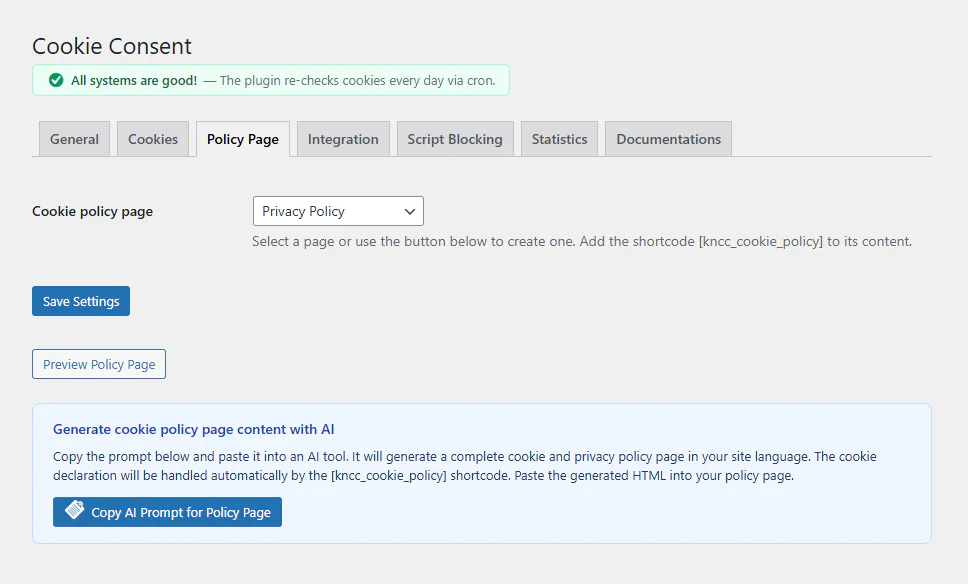
A cookie policy tells visitors which cookies the site uses, why, and for how long. The plugin keeps that part up to date for you.
Choose the page
On the Policy Page tab, pick the page that holds your cookie policy. By default it is your WordPress Privacy Policy page (Settings → Privacy). The banner’s Cookie Policy link points to this page.
The cookie declaration
Add this shortcode to the page:
[kncc_cookie_policy]It shows:
- each category with its description and a table of its cookies: name, provider, purpose and duration
- the visitor’s current choice for each category: allowed, denied or not chosen yet
- an Edit cookie preferences button, so visitors can withdraw or change consent
The table updates itself when you save the cookie list, so the declaration never goes out of step with the banner.
By default the declaration follows your theme’s styles. Switch to the plugin’s own styling on the Policy Page tab if you prefer.
Generate the policy text with AI
The rest of a privacy and cookie policy (who you are, what you collect, the legal basis, rights) is specific to your organisation. The AI Prompt for Policy Page button builds a prompt from your settings and cookie list:
- Copy the prompt and paste it into an AI tool.
- Answer the questions it asks, such as your company name and contact details. The prompt tells the AI not to guess missing facts.
- Paste the result into your policy page. It already includes the
[kncc_cookie_policy]shortcode where the cookie declaration belongs.
Have the final text checked: an AI draft is a starting point, not legal advice.
Texts on the policy page
Every text of the declaration (category descriptions, table headings, the consent status texts and the edit button) can be changed on the Policy Page tab. Empty fields keep the built-in text in the visitor’s language.
Multilingual sites
With Polylang or WPML, each language can have its own translated policy page. If a language has no translation yet, the banner links to the default-language page instead of a missing page.
Updated 28 October 2026
Something wrong or missing? Tell me in the support forum. (opens in a new tab)