
Cookies and the cookie scanner
Scan your site for cookies, describe unknown cookies with the AI helper, and keep the cookie list current with the daily check.
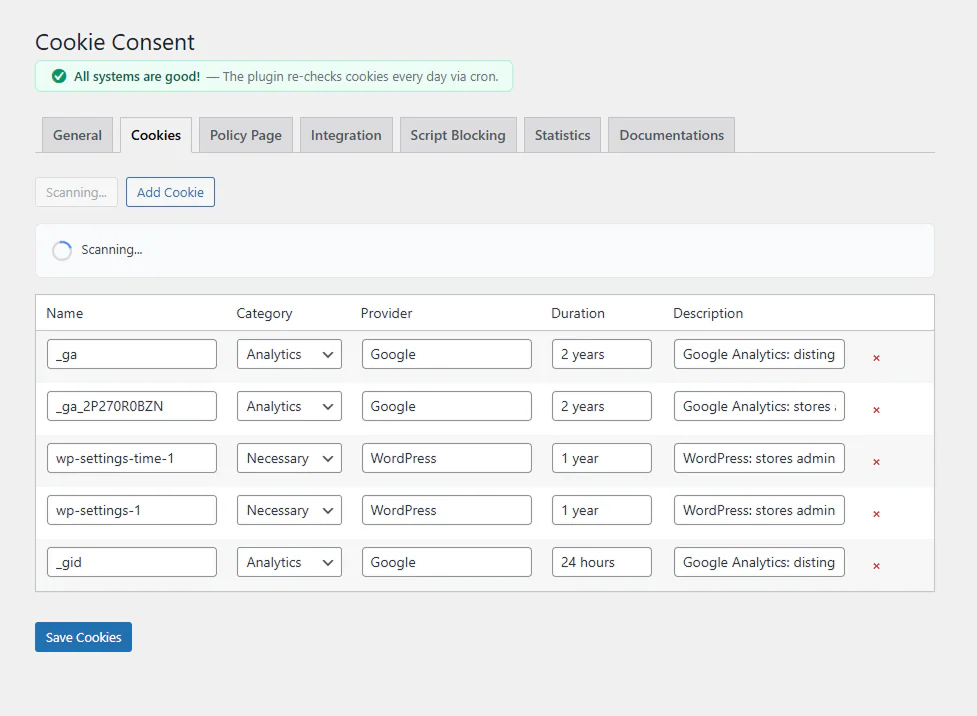
The Cookies tab holds the list of cookies your site uses. The list feeds the cookie declaration on your policy page and the category details in the banner.
Scan Cookies
Click Scan Cookies. The scanner:
- loads your front page in a hidden frame, with every category allowed for the scan only
- reads the cookies the browser received
- adds the cookies that the tracking scripts on your site are known to set, even when those scripts are still blocked until consent (Google Analytics, Meta Pixel, HubSpot and many others)
Known cookies get a category, provider, purpose and duration automatically. The scan runs in your own WordPress, with no outside service.
The scan does not change your own consent choice on the site.
Unknown cookies and the AI helper
Cookies the plugin does not recognise are listed for you to categorise. When there are any, an AI helper appears:
- Copy the ready prompt.
- Paste it into an AI tool such as ChatGPT or Claude.
- Paste the answer (JSON) back into the text box and click Import.
- Check the rows and click Save Cookies.
The prompt is written in the language of your admin, so the descriptions come back in that language.
Possibly removed cookies
If a cookie’s tracking script is no longer found on your front page, the cookie is listed under Possibly removed. Nothing is deleted automatically: review the list and remove the ones you no longer use.
Daily check
Once a day the plugin checks for cookies with no description and shows a notice in the admin if it finds any. Expected cookies are also synced when you open the Cookies tab.
Editing by hand
You can add, edit and remove rows yourself. Each cookie has a name, category, provider, duration and description. Names may end with * to match a group, such as _ga_*.
Cookie names, categories, providers and durations are shared by all languages. On a multilingual site only the description is translated per language.
Removing cookies on withdrawal
When a visitor rejects a category, the plugin deletes that category’s cookies from the browser, and removes items with the exact name of a registered cookie from localStorage. That is why an accurate list matters: it is what the plugin knows to clean up.
Updated 28 October 2026
Something wrong or missing? Tell me in the support forum. (opens in a new tab)